Why Scripts Break After Website Updates
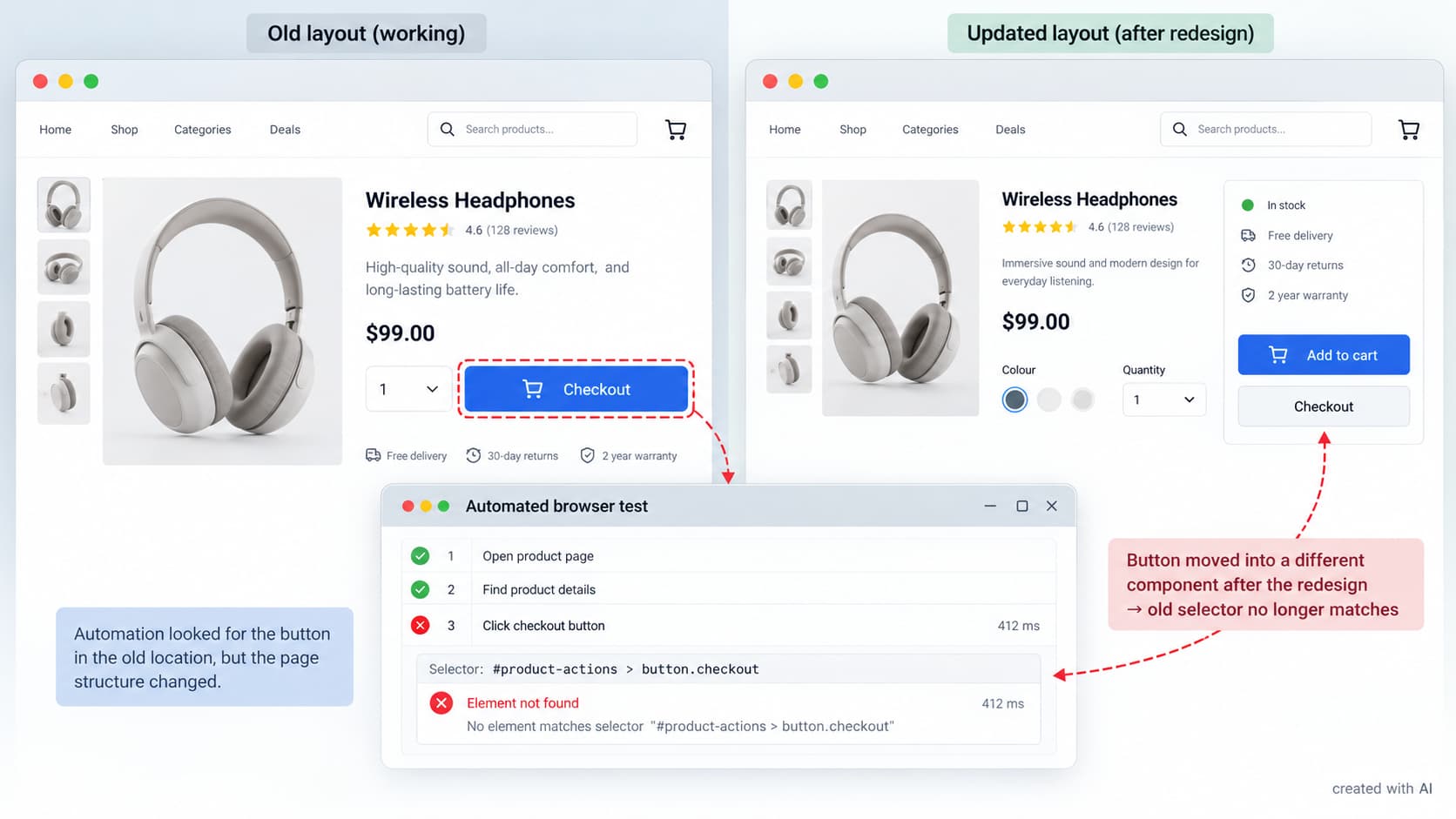
A script can run for months and fail minutes after a website release. The update may look small: a redesigned button, a search box or a login screen. Beneath the page, however, developers may have replaced the HTML structure, renamed an API field or changed when an element becomes available.
Automation depends on assumptions about another system. Once that system changes, assumptions can become outdated.
A New Layout Breaks Old Selectors
Browser scripts need a way to locate links, fields and buttons. Some rely on an element’s ID, others follow a CSS selector or XPath expression. A redesign can preserve the words “Add to cart” while placing the control inside a different component. To a shopper it appears familiar; to a script following the old path, it has disappeared.
Selectors tied to presentation are especially fragile. A rule such as “the third button in the second panel” stops working when a banner is inserted or the panel order changes. Automatically generated class names are risky too, since a new build may replace them without altering the page’s appearance.
More durable scripts use stable identifiers intended for testing, accessible roles or distinctive labels. They also verify that the located element is the expected control before clicking it.
Timing Changes Without Warning
A script may find the correct element and still reach it too early. Updated websites often load parts of a page asynchronously. Search suggestions, account details and stock information can arrive after the initial document has appeared. A fixed two-second pause may work during testing, then fail when the network or server takes longer.
Waiting longer is an unreliable repair. It makes every successful run slower and cannot guarantee that a delayed response will beat the timer. A better script waits for a meaningful condition: the field becomes editable, a loading indicator disappears or the required result enters the document.
A browser event may confirm that the HTML has been parsed while JavaScript is still fetching data. Scripts should watch the condition needed for the next action instead of treating one loading signal as proof that the page is ready.
APIs and Data Can Change Too
Not every failure begins in the interface. A script may call an API directly, read a JSON response or import a downloaded file. Renaming “customer_id” as “customerId” is enough to break code expecting the original field. A number may later be supplied as text, while a missing field may become null.
Authentication changes cause another class of failure. An update may shorten a session, introduce a fresh token, require an additional cookie or reject requests missing a new header. The error can resemble a network problem even though the server deliberately refused the request.
Before processing data, the script should check required fields, accepted types and plausible values. When validation fails, it should record the response status and a safe summary of the unexpected structure. Credentials, personal details and complete session tokens do not belong in logs.
The Browser May Become Stricter
Websites are only one moving part. Browser releases, drivers, extensions and security policies also change. Mixed content may be blocked, third-party cookies may be limited, or an automation library upgrade may alter default behaviour.
The operating environment therefore belongs in the incident record. Browser version, script version, dependencies, time and target page provide a useful starting point. Selenium’s official guidance on waits warns against mixing implicit and explicit waits because the combination can produce unpredictable timeout periods.
An update should not be blamed merely because the dates coincide. Reproducing the failure in a controlled environment helps separate a page change, browser change and temporary service outage.
Maintenance Makes Breakage Manageable
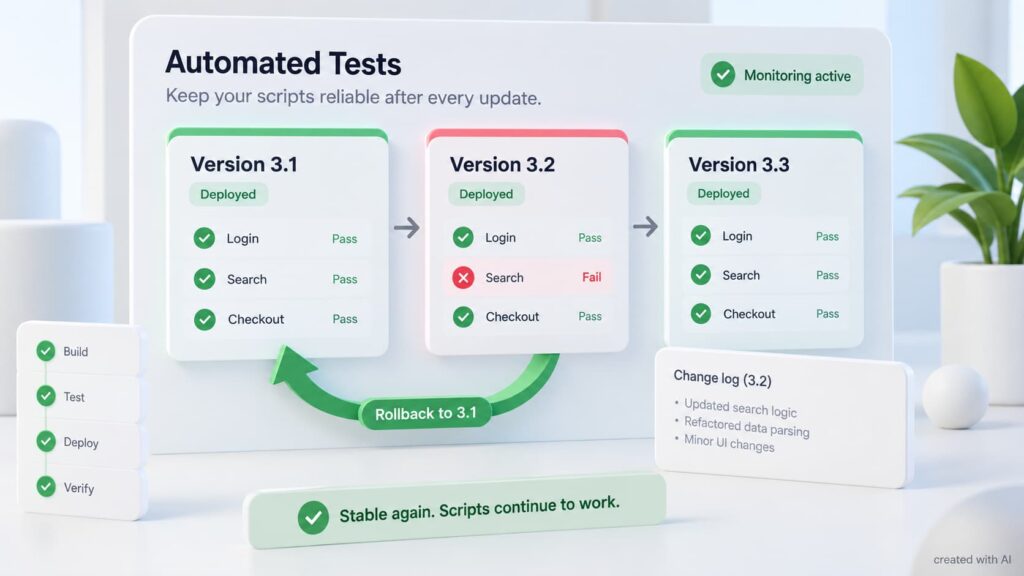
Reliable automation is maintained as a small software product, not stored as a forgotten file. Its critical actions need tests, version control and clear failure messages. A scheduled check can detect a broken login or checkout path before an important run.
A practical maintenance routine includes:
- testing key journeys after every relevant site release;
- keeping selectors and API assumptions in documented locations;
- recording dependencies and supported browser versions;
- capturing screenshots and response codes when a run fails;
- reviewing logs for slow or intermittent steps;
- retaining a known working version for rollback.
Each alert must explain which condition failed and provide enough context for diagnosis. Playwright’s locator documentation recommends user-facing attributes such as roles and labels, which generally survive cosmetic layout changes better than long CSS or XPath chains.
A Failure Is Useful Evidence
The fastest repair is not always another delay or one updated selector. First, the failed assumption must be identified: location, timing, data format, permission or environment. The correction can then address the real dependency rather than conceal the symptom.
Website updates are inevitable, so permanent scripts are unrealistic. Well-maintained scripts fail clearly, preserve useful evidence and can be adjusted without rewriting the entire workflow. That turns a sudden breakdown into a bounded maintenance task instead of a mystery.